MNQ · 15-minute

ORB Suite

Focus on a specific market and timeframe. ORB Suite combines opening range logic, strategy presets and a risk panel for MNQ on the 15-minute chart.

4.81 / 527 QuantFlow Labs reviews on Whop
MNQ · 15-minute · TradingView

Four presets. Compare the whole picture.

Explore the configurations from our dedicated ORB Suite website, including their original TradingView backtest screenshots.

Historical simulations · 2019–2026

These are the results published on the original ORB Suite site, not live returns or a forecast. The full sizing, commission, slippage and data assumptions are not specified there. Inspect the screenshots and validate the settings in TradingView before making comparisons.

The starting point

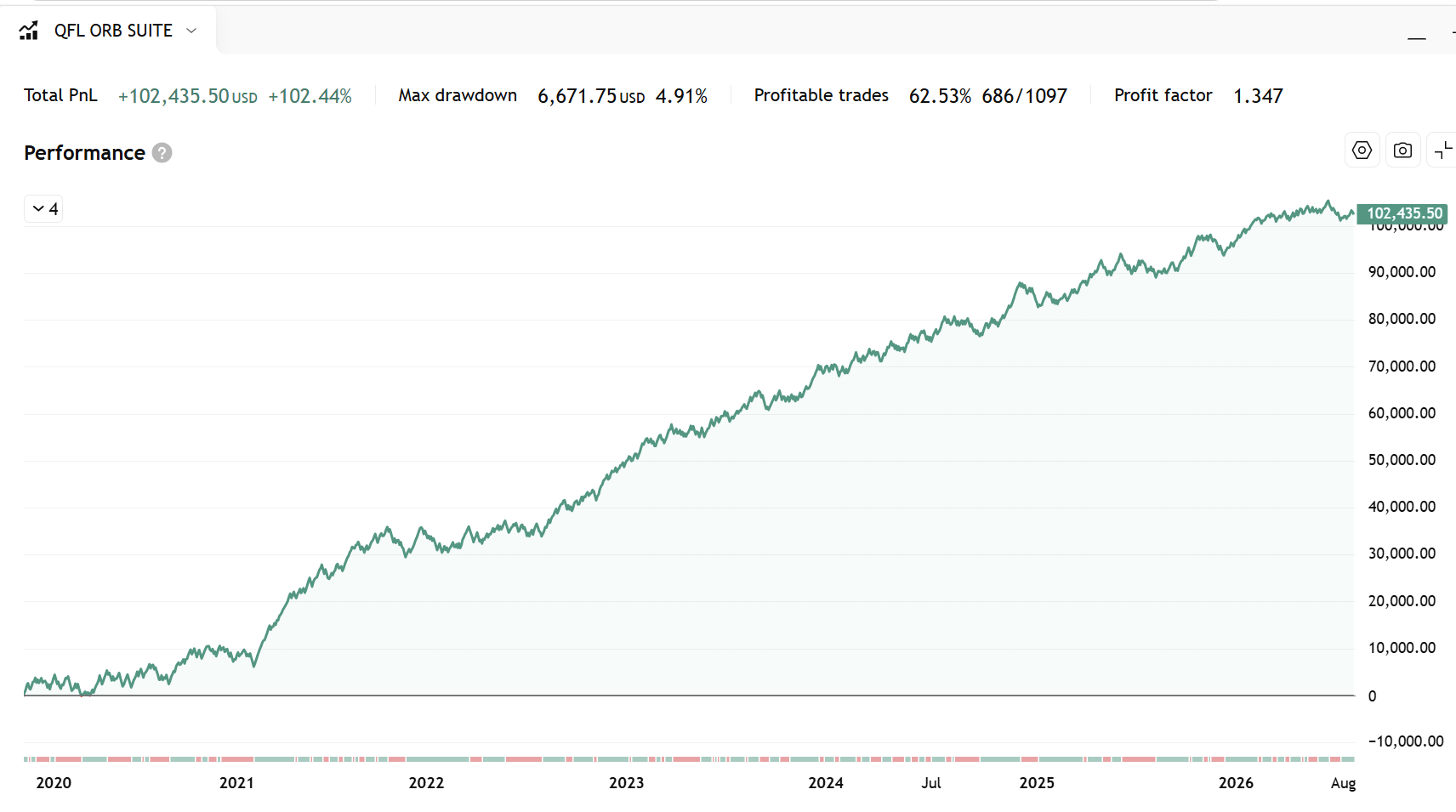
Balanced

The default 1R profile balances the frequency of winning trades with its target size. Start by learning its rules before comparing the other configurations.

Net profit
+102.44%+$102,435
Win rate
62.53%
Max drawdown
4.91%
Profit factor
1.347
Total trades
1,097
Winning trades
686
Balanced historical TradingView backtest report, 2019 to 2026View original backtest screenshot ↗
A larger target

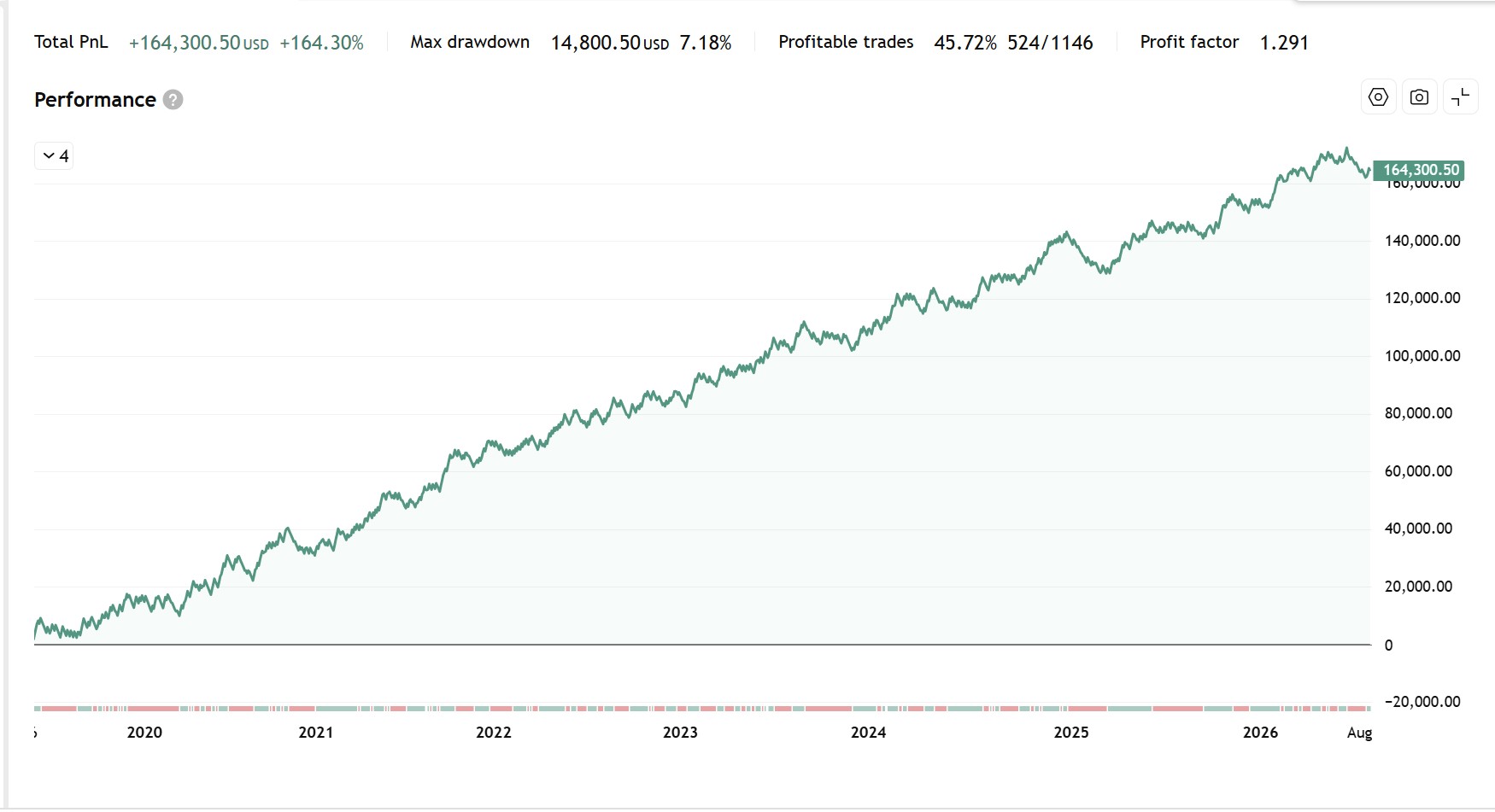
High Reward 2R

Targets 2:1 reward to risk. Its published backtest has fewer winning trades than the other presets, with a larger reward on trades that reach the target.

Net profit
+164.30%+$164,300
Win rate
45.72%
Max drawdown
7.18%
Profit factor
1.291
Total trades
1,146
Winning trades
524
High Reward 2R historical TradingView backtest report, 2019 to 2026View original backtest screenshot ↗
An alternative balance

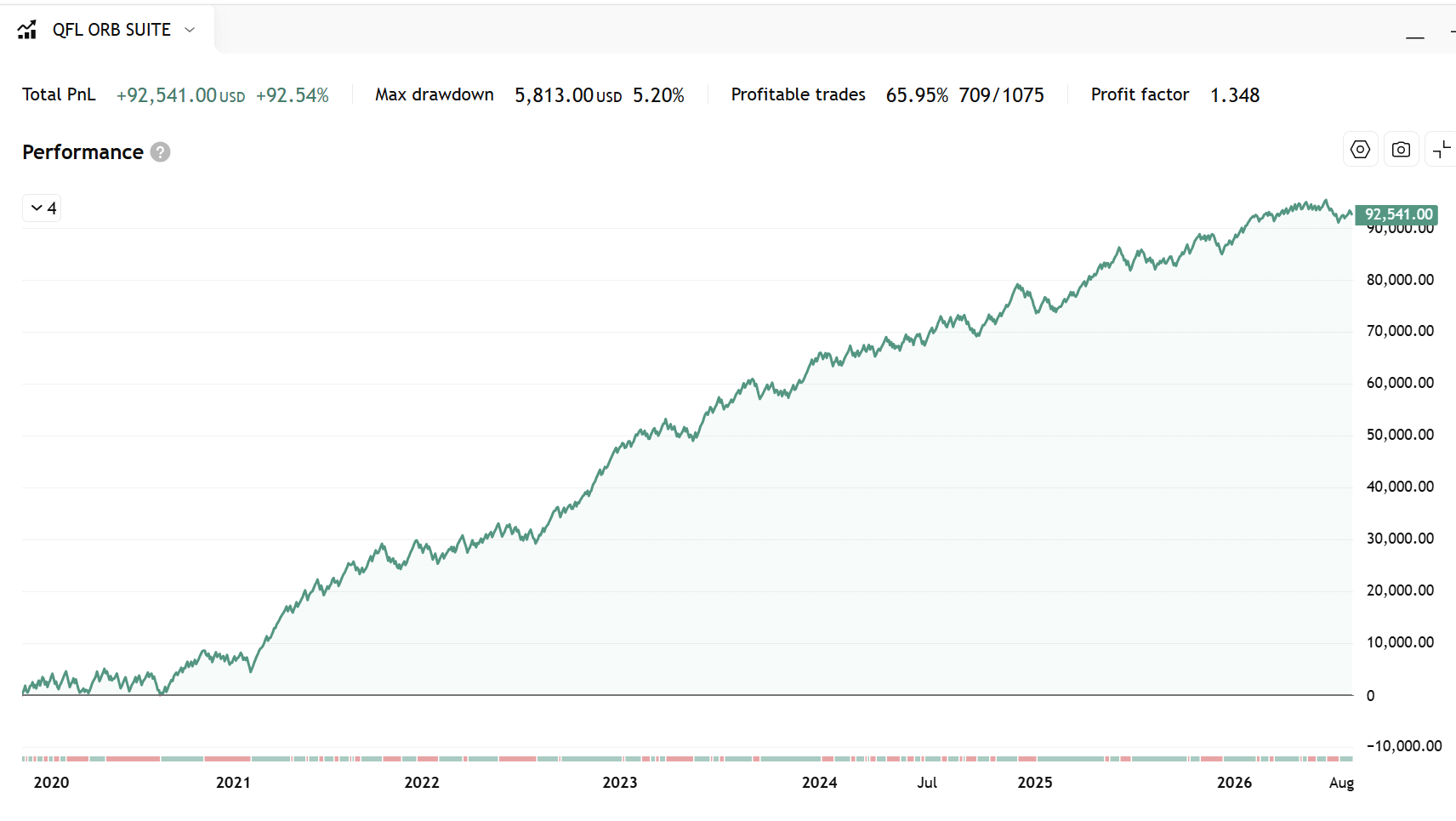
High Winrate

A profile focused on a higher proportion of winning trades than Balanced. Compare its drawdown and return as well as its win rate.

Net profit
+92.54%+$92,541
Win rate
65.95%
Max drawdown
5.20%
Profit factor
1.348
Total trades
1,075
Winning trades
709
High Winrate historical TradingView backtest report, 2019 to 2026View original backtest screenshot ↗
Shorter trade objectives

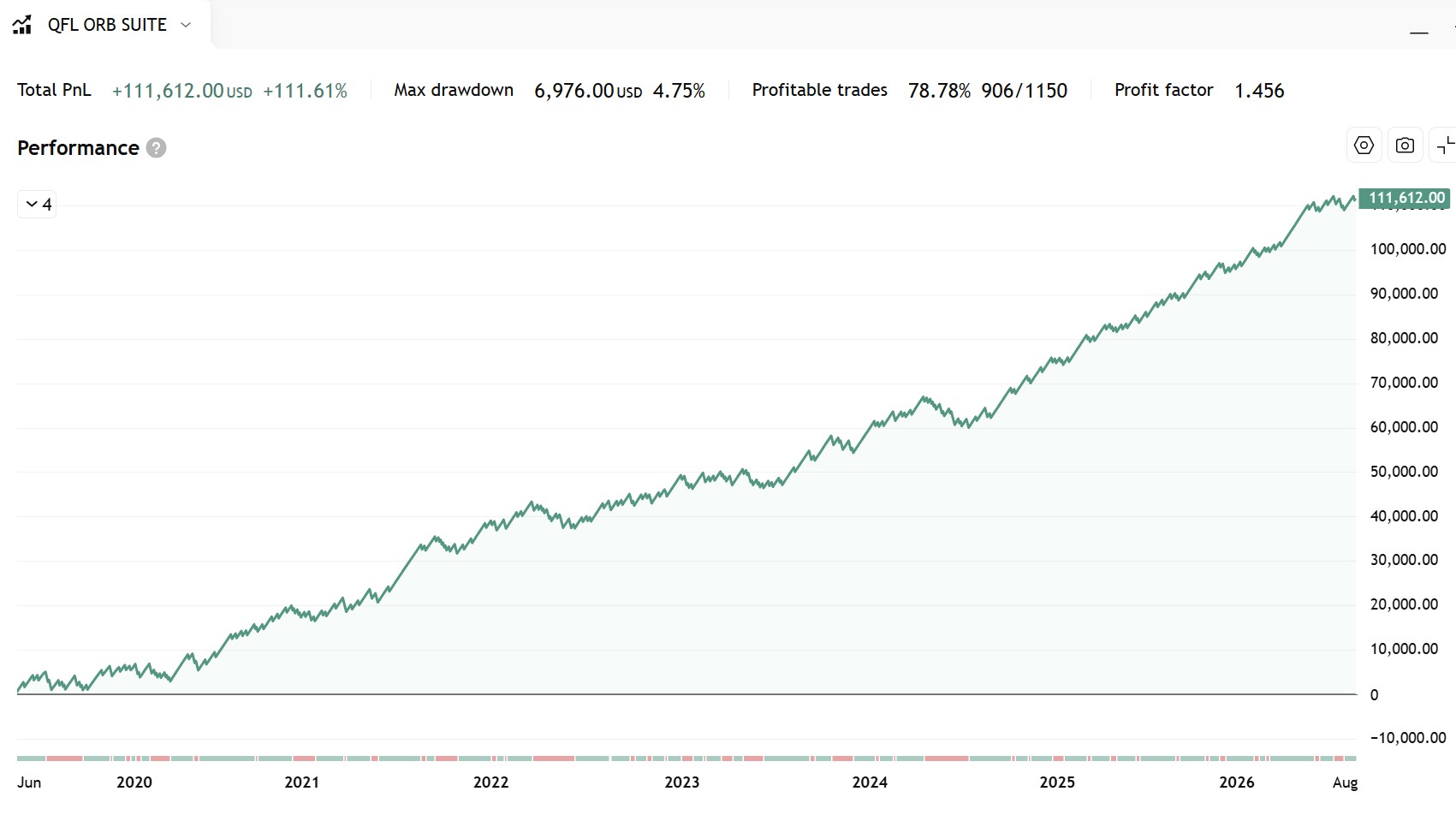
Scalper

Designed for quicker trades. It has the highest win rate of these four published backtests, but win rate alone does not describe a strategy’s risk or future results.

Net profit
+111.61%+$111,612
Win rate
78.78%
Max drawdown
4.75%
Profit factor
1.456
Total trades
1,150
Winning trades
906
Scalper historical TradingView backtest report, 2019 to 2026View original backtest screenshot ↗

Source: our original ORB Suite website, checked 27 September 2026. We show wins and total trades separately to make the original figures easier to read. Historical performance is not indicative of future results.

How the strategy is built

Defined rules. An honest view of testing.

Understanding the method matters as much as reading the result.

01 / CORE LOGIC

Keep the framework focused

A defined opening range, broad trend or regime confirmation and trade management form the core. The approach avoids stacking numerous narrow conditions solely to improve a historical curve.

02 / PRESET INTEGRITY

Separate presets from research

The four named configurations are isolated from the wider custom research controls. Experiment with custom settings without silently changing the supplied presets.

03 / DIFFERENT CONDITIONS

Look beyond headline profit

The development approach considers different years, volatility spikes, trends and ranging conditions. A total return does not show the sequence of losses or the difficulty of following the rules.

04 / FORWARD TESTING

Keep testing on unseen data

Simple rules do not eliminate overfitting. Targets, stops and timing can still be influenced by the past. Forward testing checks how the selected configuration behaves after the period used to develop it.

TradingView native

Your opening range, mapped out.

Opening range levels, entries, stops and targets on the chart, with a dedicated settings panel and risk references.

InstrumentMNQ
Chart timeframe15 minutes
PlatformTradingView
Published test period2019–2026

From the range to the planned trade

  • Dynamic targets. Entry, stop and risk-to-reward levels are plotted on the chart.
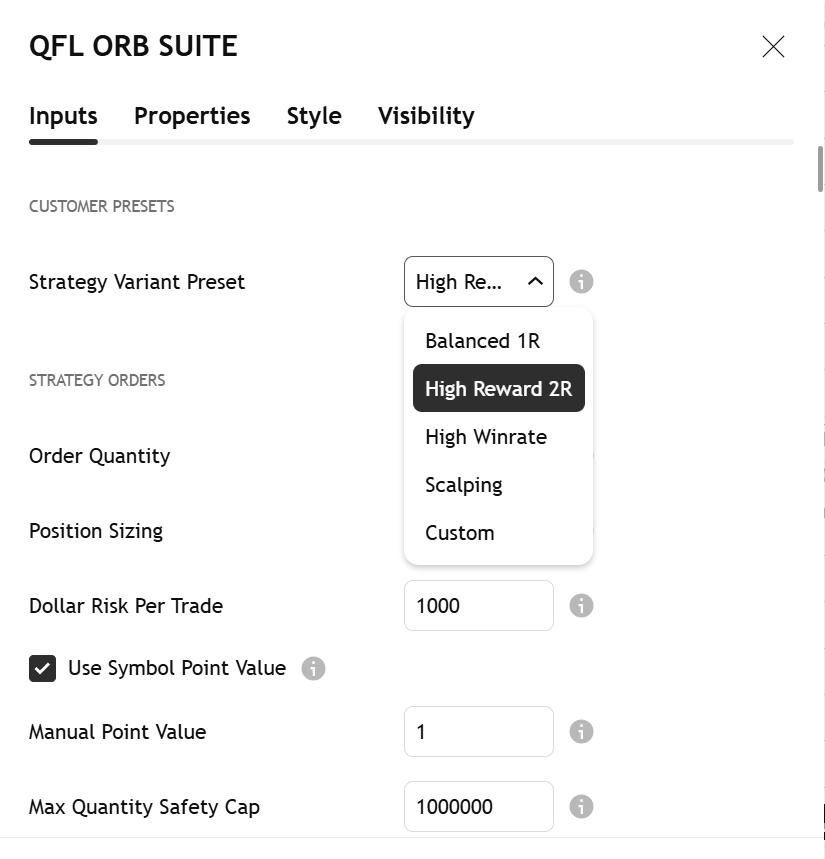
  • Four strategy presets. Switch between Balanced, High Reward 2R, High Winrate and Scalper.
  • Dollar risk sizing. Set a cash-risk reference and use the position-size calculation to frame the trade.
  • Alerts and webhooks. Follow signals manually or configure a compatible external execution workflow.
  • Session management. Use the ORB panel and end-of-day cutoff described in the product setup.

Chart drawings and strategy orders are not confirmations of a live broker fill. Check contract sizing, session timing and alert configuration.

Original ORB Suite TradingView settings panel
Original settings panel · Open image for a closer look ↗
MNQ 15-minute chart walkthrough · Original demonstration
Chart and plotted levels · Original demonstration

These demonstrations are from the original ORB Suite site and may show an earlier interface. Watch on the original site ↗

Before you get access

ORB Suite questions, answered.

The setup, the testing and what happens after you purchase.

Read the opening range guide →
Does ORB Suite repaint?

ORB Suite is designed to confirm signals at candle close. The original product description states that it does not repaint or use lookahead bias. Historical strategy results are simulated: candle-close confirmation does not guarantee the same broker fills in live trading. Check the current version in replay and forward testing.

What instrument and timeframe is it built for?

MNQ (Micro E-mini Nasdaq-100 futures) on a 15-minute chart. The published 2019–2026 backtests use this configuration. Check your symbol, contract data and session settings; the results should not be assumed to apply to other markets or timeframes.

Can I trade it manually or automate it?

Both workflows are supported. Follow the plotted signals manually, or configure TradingView webhook alerts with a compatible execution service and broker. Webhook routing, order handling and broker access are separate setup steps; the indicator alone does not connect or trade your account.

What is included with access?

The TradingView strategy indicator, all four preset configurations, a setup guide and access to the private QuantFlow Labs community on Whop. Review the current checkout for the membership option and billing terms.

How do I get access after purchase?

Your purchase is managed in Whop. Open your confirmation and product onboarding for setup instructions and the private community. Supply your exact TradingView username and follow the invite-only access instructions before adding the script to your chart.

Is ORB Suite suitable for beginners?

Balanced 1R provides a defined, rules-based starting configuration. You still need to understand TradingView, futures contracts, position sizing and how to place and manage orders. Learn the rules and practise in a simulated environment before using live capital.

Is the strategy curve fitted to historical data?

The core uses an opening range breakout, broad trend or regime confirmation and trade management. The four named presets are isolated from the custom research controls, so experimenting with those controls does not change a supplied preset. Stop distances, targets and timing can still be influenced by historical data. No backtest rules out overfitting; forward performance and consistency across different years and market conditions remain essential checks.

Inside the tool

A defined routine for the MNQ open.

Built for MNQ 15m

The published setup is designed around Micro E-mini Nasdaq-100 futures on the 15-minute timeframe.

Four strategy presets

Choose Balanced, High Reward 2R, High Winrate or Scalper, then test the selected configuration.

Track planned risk

The risk calculator and ORB panel show entry, stop, target and cash-risk references, with an end-of-day cutoff.

Who is it for?

For MNQ traders who want a defined opening range routine and are prepared to test the selected preset under realistic trading costs.

Before using it live

Historical backtests are not forecasts. Results depend on settings, data, costs and fills; validate your own configuration before use.

Review the current product listing on Whop, follow the onboarding guidance and test your settings in a simulated environment. For help with access or configuration, contact QuantFlow Labs through Whop.

Compare all indicators →
Customer feedback on Whop

Hear from the community.

4.81 / 527 ratings & reviews · Read all ↗
Support
“very friendly and accommodating. A++++ on quick support”
PB@basnetprasanna824 · Whop member
The experience
“Quick costimer support, and a fantastic indicator”
csikigezaroland@luckysniper117 · Whop member
The tools
“Incredible tool.”
Andy@andywalka · Whop member

Selected excerpts from QuantFlow Labs reviews on Whop, reproduced as written. This is the store-wide rating, not a rating for any individual indicator. Checked 27 September 2026; the latest reviews and rating are on Whop.

Checkout powered by Whop

Get ORB Suite.

Your purchase and product access are managed through your Whop account. Choose a plan below, or buy from the same QuantFlow Labs listing on Whop.

Prefer Whop? Buy there ↗
  1. Review your plan and billing terms.
  2. Use your exact TradingView username when asked.
  3. Follow the access instructions in your Whop account.

Loading secure checkout…

Prefer a separate checkout? Open checkout on Whop ↗